
Getting Your Blog Seen: A Guide to SEO Success
It can feel like your brilliant blog posts just vanish the moment you hit 'publish'. You pour your time, your research, your insights into writing something you truly believe in, but then... silence. In a digital world that's absolutely packed with content, just putting words out there isn't enough anymore. You need a way for search engines — and more importantly, people — to find your stuff.
That’s where blog SEO, or Search Engine Optimization, comes in. We often talk about it, and what it really means, as the Wix Team puts it, is "the practice of optimizing a blog's content and structure to improve its visibility and ranking on SERPs" — that's Search Engine Results Pages. It’s not just some technical wizardry, though. The main thing we're trying to do here is make our blogs more attractive to both the robots that crawl the internet and the actual users searching for answers, which then brings in more organic traffic to our sites.
Think of it this way: your blog post is like a really good book you’ve written. If that book is just tossed onto a giant, messy pile in a forgotten corner of the library, no one will ever know it exists. Blog SEO is like giving that book a proper shelf, a clear title, a helpful description in the library’s catalog, and maybe even a little spotlight. It helps readers discover your work.
When we focus on good blog SEO, we aren't just boosting a single post. This practice helps build up your entire site’s authority, meaning search engines start to see you as a trustworthy source. It gives you enhanced visibility, sends a steady stream of site traffic your way, and can even mean more lead generation for your business. It's a key part of any solid content optimization plan, stopping your posts from getting buried.
So, how do we make sure our carefully crafted words don't just disappear into the digital ether? We’ve gathered 10 actionable tips, from smarter keyword research to better content structure, all designed to help you get your blog content seen by search engines and, ultimately, by more readers.
Let's start by figuring out what people are actually searching for, because that's the real first step to connecting with your audience.
Key Takeaways
Keyword researchis the cornerstone for making your blog visible and attracting the right organic traffic. You really need to understand what people are searching for.- Structure your posts clearly with good headings and use keywords naturally—it helps both readers and search engines.
- Optimize all your on-page elements, like image text and links, to give your content a big SEO value boost.
- Keep your content fresh with regular updates and offer truly unique, useful information to hold your search rankings and build authority.
How do I find the right keywords to attract my audience?
Finding the right keywords means starting with keyword research—it's the core step of any successful SEO strategy. You'll want to prioritize long-tail keywords (longer, more specific phrases) that match exactly what your audience is searching for, a concept often called search intent. By looking for terms with sufficient search volume that aren't already saturated by competitors, you can connect with engaged visitors and drive meaningful organic traffic to your blog.
We usually start with this basic idea: what questions are people asking, and what problems are they trying to solve? It’s like figuring out what items to stock in your little shop based on what people actually come in and ask for, rather than just guessing.
To help you move from guessing to data-driven strategy, here are some of the best free keyword research tools available right now:
- Google Keyword Planner: The gold standard for data straight from the source. While built for advertisers, it is excellent for discovering new keyword ideas and seeing how search volumes change over time.
- AnswerThePublic: This tool is perfect for uncovering the "questions" people ask. It generates a visual map of who, what, where, why, and how phrases related to your topic.
- Ahrefs Free Keyword Generator: This tool provides a snapshot of the top 100 keyword ideas from their massive database, including "Keyword Difficulty" scores to help you see how hard it will be to rank.
- Google Trends: Great for checking the "vibe" of a keyword. It helps you see if a topic is gaining popularity or if it’s a seasonal trend you should wait to write about.
- Ubersuggest: The free version of this tool offers great suggestions for long-tail keywords and provides a quick look at what your competitors are ranking for.
Using these tools helps you bridge the gap between what you think your audience wants and what they are actually typing into the search bar. This foundational step is really what helps your content get seen and draws in the right people, not just anyone.
The Core: Why Keyword Research Matters
Keyword research is the absolute first step. It’s the engine that drives visibility and brings organic traffic to your blog content. Without it, you're pretty much guessing what readers want, and hoping for the best. And that’s a hard way to build anything. I mean, we need to know what words people type into search engines to find answers, right? Knowing these terms helps us craft content that directly speaks to those queries.
Going Specific: The Power of Long-Tail Keywords
After that initial research, we look for something special: long-tail keywords. These are those longer, more specific phrases people type in—like "project management software for remote teams 2025" instead of just "project management software." Think of it this way: "software" is a giant ocean. You're competing with everyone and their uncle. But "project management software for remote teams 2025" is a smaller, clearer pond. It's less crowded, meaning long-tail keywords are generally less competitive than those broader, generic keywords. This gives your specific blog content a much better shot at ranking well. It helps capture visitors who know exactly what they’re looking for.
Reading Minds: Understanding Search Intent
Here's a big one: you need to understand search intent. This means figuring out why someone is typing a particular keyword into a search engine. Are they looking for information? Trying to buy something? Comparing products? Each targeted keyword should connect directly to a specific user need. We want our blog content to effectively address user needs, not just mention a keyword. If someone searches for "how to fix a leaky faucet," they're looking for a step-by-step guide, not a history of plumbing. If we match that intent, we bring in engaged visitors who actually find value in what we've written. If we don't, we just get "empty traffic"—people who land on our page and bounce right off because it wasn't what they wanted.
Checking the Competition and Planning Your Content
When we're digging for keywords, we're always trying to find terms with sufficient search volume—enough people searching for it to make it worth our time—but that aren't already heavily covered by competitors. It's a sweet spot. If everyone else has already written the definitive guide on something, we might need to find a new angle or a different keyword to target.
Once we have our list of targeted keywords and a good sense of the search intent behind them, we put together a content blueprint. This blueprint is basically our game plan. We list out our keywords, think about who is searching for them, and figure out what they aim to accomplish when they search. This ensures our content structure is set up to directly answer those user needs.
This focused approach to keywords, from broad research to understanding intent, is how we build the foundation for a blog that truly connects with its audience and keeps them coming back. Next, let’s talk about how to make sure those keywords actually show up in your content in a way that helps, not hurts, your SEO.
What does 'SEO-friendly' content look like in practice?
An SEO-friendly content piece is structured clearly with an introduction, body, and conclusion, making it easy to read and understand for both people and search engine bots. It balances the use of targeted keywords with natural language, uses headings and paragraphs to enhance readability, and avoids keyword stuffing to provide value and improve search engine rankings.
So, what does that really mean when we sit down to write? I think of it like organizing a toolbox. You don't just dump all your wrenches, screwdrivers, and hammers into one big pile. You put them in compartments, label the drawers, and arrange them so you can find what you need quickly. SEO-friendly content works the same way.
Giving Your Content a Backbone: Structure Matters
A good article needs a clear content structure. This isn't just a suggestion; it's essential for readability, just like Yoast SEO points out. We generally aim for an introduction that hooks the reader, a body that explains things in detail, and a conclusion that wraps it all up. This flow isn't just pretty; it helps search engine bots understand the main points and how they connect. If your content jumps around, it's harder for those bots to figure out what your page is actually about. And if bots get confused, so do people.
Making It Easy on the Eyes: Headings and Paragraphs
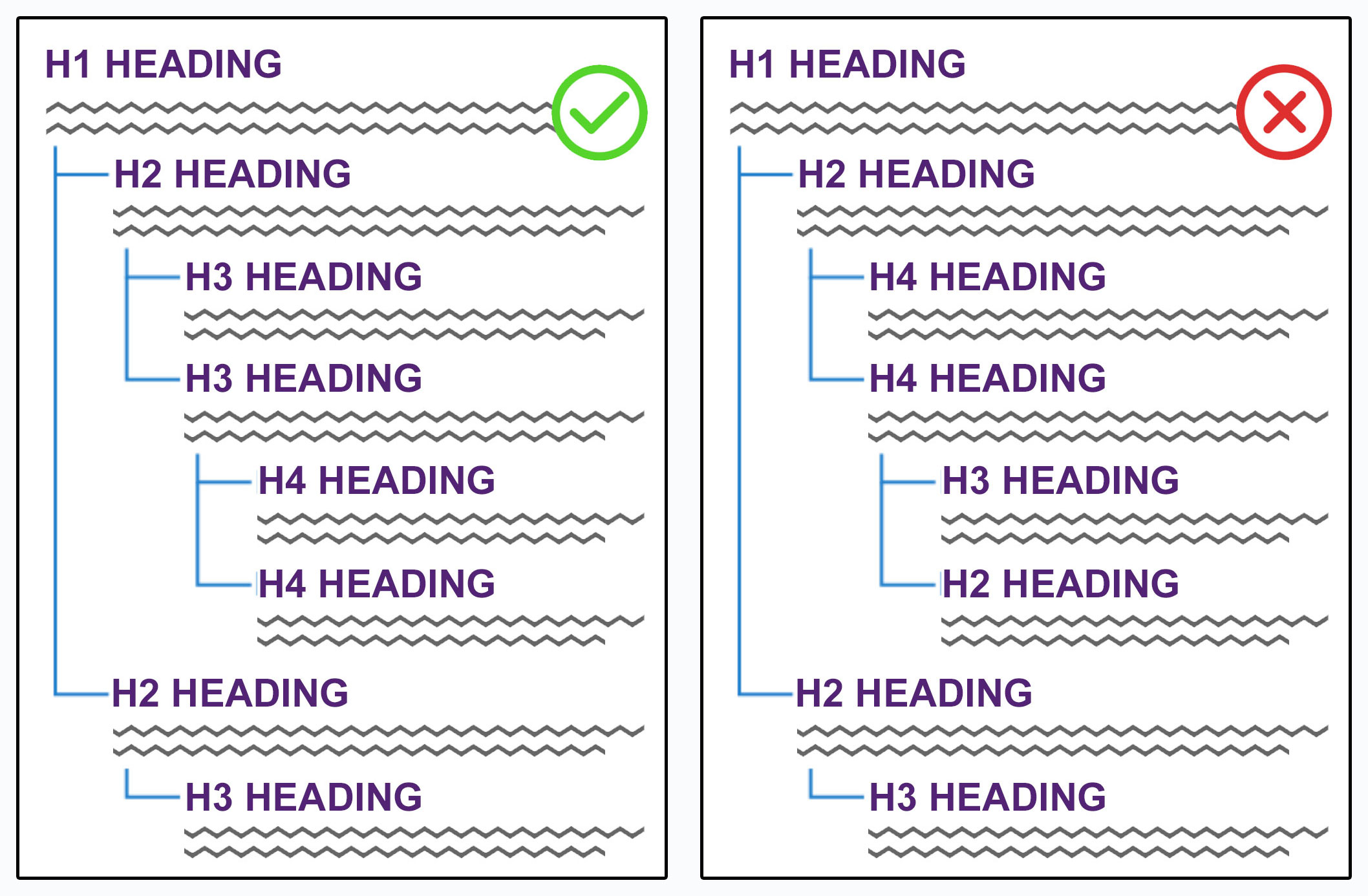
No one wants to read a giant wall of text. Seriously, it's intimidating. That's why paragraphs and headings are so important. Breaking up your text with short paragraphs and using headings (like H2s and H3s) significantly enhances content readability. Think about scanning a menu at a restaurant. You look at the main categories first, then dive into the dishes under each. Headings do that for your blog post. They provide signposts for your readers, letting them skim and find the information they need fast. This also helps search engines understand your content hierarchy—what's most important and what falls under it.
The Balancing Act: Keywords and Readability
This is probably where a lot of us get a little tangled up. We know keywords are important, but how much is too much? The Yoast SEO Team puts it well: "Writing SEO-friendly blog posts requires balancing keyword usage with readability to engage your audience effectively." We're not writing for robots, after all; we're writing for actual people who are looking for answers.
If we just cram keywords into every sentence, it feels unnatural. This is called keyword stuffing, and it’s a big no-no. Not only does it make your writing sound weird and hard to read, but over-using keywords can detract from readability and negatively impact search engine rankings. Google, and other search engines, are smart enough to recognize when you're just trying to play games. They might even see keyword stuffing as an attempt to manipulate rankings, which can get your page pushed down the results page.
Instead, we want to sprinkle our keywords in naturally. Use transition words to make your sentences flow smoothly, and don't be afraid to use related keywords that expand on your main topic. This helps improve the context of your text, making it richer and more helpful. It's like having a conversation where you naturally use different ways to say the same thing without sounding like a broken record. We want our content to be relevant, informative, and in-depth, not just a keyword checklist.
Making your content SEO-friendly really boils down to making it user-friendly first, and then tweaking it so search engines can also understand and appreciate its value. Next up, let’s talk about the specific words and phrases we pick, and how to find the very best ones for our content.
Beyond text: How do on-page elements boost blog visibility?
On-page elements like headings, internal links, image alt text, and meta descriptions significantly boost blog visibility by helping search engines understand your content better and by improving the user experience. These details signal your blog's relevance and authority, telling crawlers what your page is about. They guide readers, making information easier to find, which in turn keeps people on your site longer.
When we talk about on-page elements, we're getting into the nitty-gritty of what’s actually on your blog post page, beyond just the main body text. Things like the headlines you choose for sections, the links you embed, even the words you use to describe your images—every single one of these pieces works hard to make your blog more visible and prove its authority to search engines. The folks over at Siteimprove mention this explicitly: "Headings, links and, even image text — each element on the page works to boost visibility and prove authority." This means we can't just write great main text and call it a day; the little details matter a lot.
Crafting Helpful Headings
Think of your headings (H2, H3, etc.) as signposts on a road trip. Without them, readers would just see a long stretch of highway, with no idea where they are or what’s coming next. Good headings break up your text, making it much easier to read and scan. This structure doesn't just help people; it also helps search engines understand the hierarchy and main topics of your content. When your headings clearly state what each section is about, search engines can better index your content for relevant searches. It shows them you've put thought into organizing your information.
Smart Linking: Guiding Readers and Bots
Links are another really big piece of the puzzle. We've got two kinds to think about: internal links and external links.
- Internal links point to other pages within your own blog or website. They help search engines discover more of your content, showing how different posts relate to each other. For readers, these links offer a path to more information, keeping them engaged on your site. Imagine a library where every book on a topic has a note saying, "Check out this other book!" That's what internal links do.
- External links point to other credible websites. When you link out to a reputable source, like a study from a university or an article from an industry authority, it tells search engines that you've done your research. It also shows that you're providing well-supported information. This can build trust and authority for your own blog content.
We want to make sure these links are relevant and helpful. Don't just throw links in for the sake of it.
Image Alt Text: Making Visuals Visible
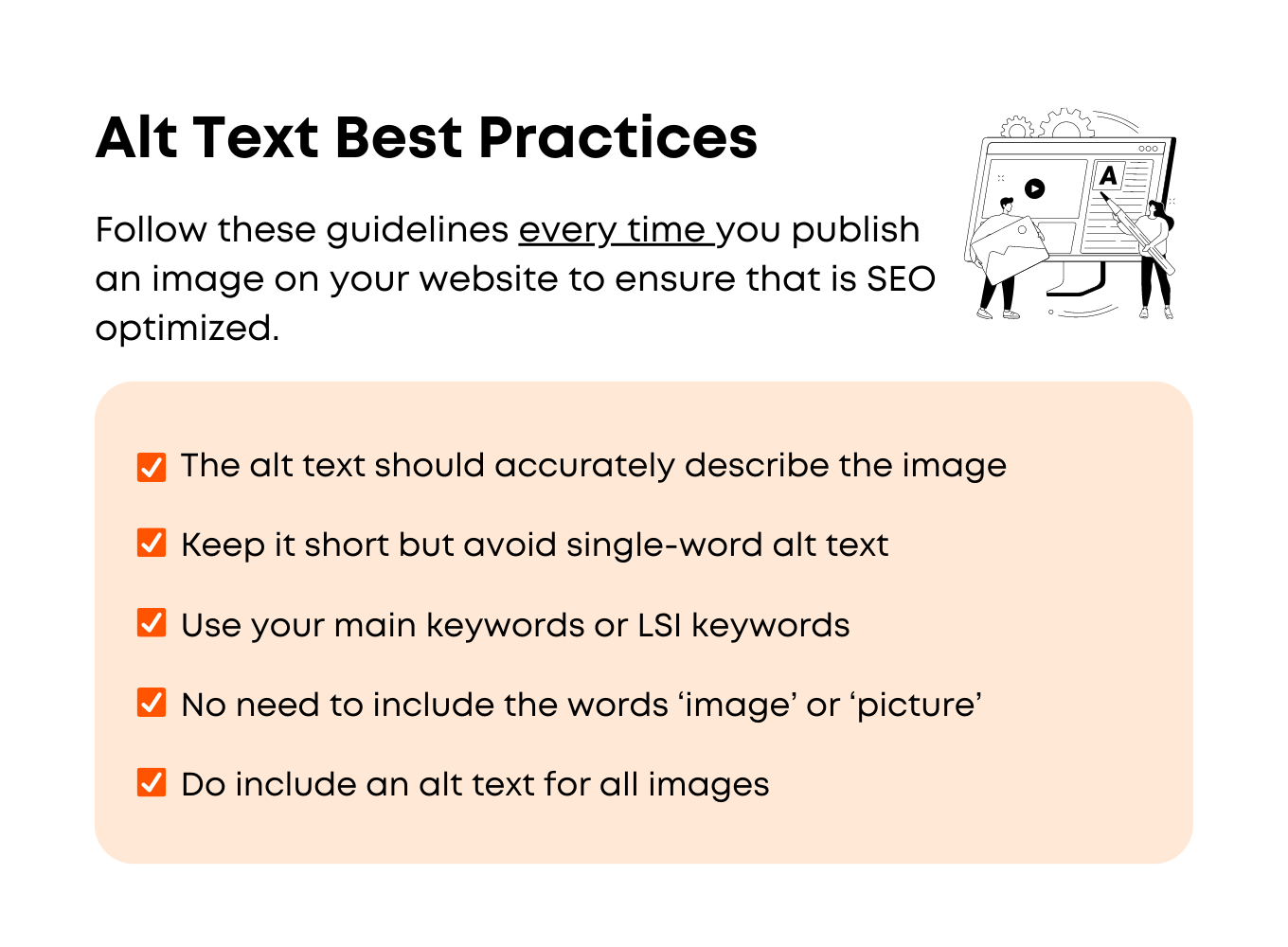
Images break up text, make your blog more engaging, and can often explain complex ideas visually. But search engines can't "see" an image like we can. That’s where alt text comes in. It's a short, descriptive phrase that explains what an image is about.
For example, instead of alt="image", you might write alt="person typing on a laptop with a green coffee cup" or alt="diagram showing data flow in a cloud system". This helps visually impaired users who rely on screen readers. And it gives search engines more context about your page. It’s a small detail, but it can significantly improve blog visibility, especially for image searches.
The Power of Meta Descriptions
The meta description isn't something you see on your blog post itself, but it's super important for blog visibility. This is the short snippet of text that appears under your title on search engine results pages (SERPs). It’s your chance to summarize what your post is about and entice someone to click.
While meta descriptions might not directly impact your ranking as much as, say, keywords in your headings, a well-written one can dramatically increase your click-through rate. More clicks tell search engines that your content is relevant and valuable, which can indirectly help your ranking.
Why Unique, Useful, and In-Depth Information Rules
All these on-page elements work best when they're supporting truly great content. Search engines are always trying to give users the best possible answers. They "prioritize content that is relevant, informative, and in-depth on a given topic," according to our research. If your blog post just skims the surface or repeats what everyone else is saying, it's going to be hard to stand out.
We want our blog content to offer something unique—a fresh perspective, a deeper dive, or a really clear explanation. When we couple that kind of valuable information with good structured content—meaning well-organized with clear headings, helpful links, and descriptive alt text—it creates a fantastic user experience. And optimized content that delivers a great user experience not only drives organic traffic but also makes people want to come back for more. It's like setting up a really organized shop; customers can easily find what they need, they have a good experience, and they're more likely to return.
So, while the words on the page are key, the scaffolding around those words—the on-page elements—are what truly make your message shine for both people and search engines. Next, let’s dig into how understanding what people really want when they search can shape our content.
Why should I regularly update my blog posts?
Regularly updating your blog posts is a recommended SEO practice because it signals to search engines that your content is fresh, relevant, and still valuable to users. This practice helps maintain visibility on search engine results pages, preventing your posts from getting buried by newer information. It also improves user experience by ensuring readers always find current, accurate information.
We've learned that blog content should be regularly updated and contain unique, useful information. Think of your blog posts like a garden. You plant seeds—your initial content—and they grow. But if you never water them, pull weeds, or add fresh soil, they'll eventually wither away. Similarly, your blog posts need care. A solid SEO content optimization plan is crucial for keeping blog posts visible and keeping them from being lost in the noise. When search engines see you're updating an older post, it often gets a little bump, a fresh look, because it suggests the information is still accurate and helpful.
Keeping Your Content Fresh and Findable
Regular updates don't always mean a complete rewrite. Sometimes, it's about tweaking information that's become a bit dated, adding new statistics, or refining explanations to make them clearer. Maybe a tool you mentioned has a new version, or a best practice has evolved. We also look at things like headings, links, and image text during these updates because they can significantly boost visibility and establish authority. This kind of iterative improvement helps optimize content which not only drives organic traffic but also contributes to a better overall user experience.
Here's a concrete way to think about it: imagine you're a librarian. You have hundreds of books. If someone asks for information on, say, "Python 3.12 features," you wouldn't hand them a book from 2010 about Python 2. You’d look for the newest edition, the one with the most current details. Search engines do something similar. They want to show people the most up-to-date and relevant stuff available.
Using Simple Language and SEO Tools to Your Advantage
While updates keep things fresh for search engines, how we write them keeps things fresh for people. My research shows that writing in understandable language can attract more visitors and encourage them to stay longer on your site. Nobody wants to read something that feels like an academic paper unless they're actually in academia. We want our blog posts to be approachable, easy to digest. Using shorter sentences, breaking up big paragraphs, and explaining technical jargon—if we must use it—makes a huge difference. It's about being a good host; you want your guests to feel comfortable, not overwhelmed.
And we don't have to do it all manually, either. Tools really help. Utilizing SEO plugins, such as Yoast SEO, can aid in optimizing blog posts efficiently. I use Yoast on my WordPress sites, and it gives real-time feedback on readability and keyword usage. It's like having a little assistant looking over your shoulder, pointing out where you could make a sentence simpler or where you might want to add your main keyword. This doesn't mean letting the plugin do all the work, but it definitely guides you toward writing SEO-friendly blog posts that balance keyword usage with readability.
By keeping our content fresh and writing so everyone can understand, we make sure our blog content remains a valuable resource, drawing people in and keeping them engaged. Next, we'll talk about how these regular updates fit into a broader strategy for making your content stand out.
Further Reading
To really dig into what makes a blog post shine in search results, I found these resources super helpful. They offer different angles on getting your content seen and read.
Read Next
View all articlesEtsy SEO Masterclass: Rank Handmade Goods on Page One
Unlock Etsy SEO secrets! Learn how attributes, long-tail tags, and shipping strategies get your handmade items to page one.
Financial Stability for Single Parents: 12 Practical Strategies
Discover 12 actionable ways single parents can build financial stability, from budgeting and debt reduction to income boosting and long-term planning.
Bundle Digital Products: Boost Sales & Order Value
Learn how to bundle digital products to increase average order value (AOV). Discover pricing, marketing, and selection strategies.
DTI vs. Credit Score: Which Matters Most to Lenders?
Understand the difference between Debt-to-Income ratio and credit score. Discover which metric lenders prioritize for loan approvals.